
Download Cigati OST Viewer Tool – Free Windows Software to View OST Files Securely
Looking for a reliable way to access your Outlook Offline Storage Table (OST) files? The Cigati OST Viewer Tool is a free, lightweight Windows application designed to help users open and view OST files without requiring Microsoft Outlook. This tool is ideal for recovering lost data, troubleshooting mailbox issues, or simply previewing archived emails and attachments. With a clean, intuitive interface and no installation hassle, Cigati OST Viewer Tool offers a secure and efficient solution for accessing OST files on Windows systems. Whether you're a business professional, IT administrator, or home user, this free software delivers fast results with minimal effort.
Why Choose Cigati OST Viewer Tool for OST File Access?
OST files are crucial for Microsoft Outlook users who work in cached exchange mode. When your mailbox is disconnected from the server, Outlook uses an OST file to store a local copy of your mailbox data. However, if the OST file becomes corrupted, inaccessible, or you need to recover data without Outlook, the Cigati OST Viewer Tool steps in as a powerful, no-cost solution. Unlike many commercial tools that demand hefty fees, this software is completely free to download and use, making it a top choice for budget-conscious users.
One of the standout features is its ability to open and display the contents of OST files without requiring Outlook to be installed. This is especially useful in environments where Outlook isn’t available or when troubleshooting data integrity issues. The tool supports all versions of OST files, including those created by Outlook 2007 through Outlook 2021, ensuring broad compatibility. The interface is straightforward—just drag and drop your OST file into the viewer, and within seconds, you’ll see a hierarchical view of folders, emails, contacts, calendars, and attachments.
Security is another major advantage. The tool operates locally, meaning your data never leaves your device. There’s no cloud upload, no third-party access, and no risk of data breaches.
This makes it a trustworthy option for handling sensitive business or personal information. Additionally, the software is lightweight and doesn’t consume significant system resources, ensuring smooth performance even on older Windows machines. With no hidden fees or trial limitations, Cigati OST Viewer Tool delivers real value—making it one of the best free tools for OST file viewing available today.
Key Features and How to Use the Cigati OST Viewer Tool
The Cigati OST Viewer Tool comes packed with essential features that make file exploration fast and intuitive. Here’s what you can expect:
- Free to Download and Use – No trial, no registration, no hidden costs. Just download and start viewing your OST files immediately.
- Supports All Outlook OST Versions – Compatible with OST files from Outlook 2007 to Outlook 2021, ensuring broad usability across different systems.
- Complete Data Preview – View emails, attachments, contacts, calendars, tasks, and notes without needing Outlook.
- Drag-and-Drop Interface – Simply drag your OST file into the tool to load and browse content instantly.
- Search and Filter Options – Find specific emails or attachments quickly using built-in search functionality.
- Secure Local Processing – All data remains on your device; no uploads or cloud storage involved.
- Lightweight and Fast – Minimal RAM and CPU usage for smooth performance on any Windows PC.
Using the tool is simple. First, download the software from the official Cigati Solutions website. Once downloaded, extract the ZIP file (no installation required).
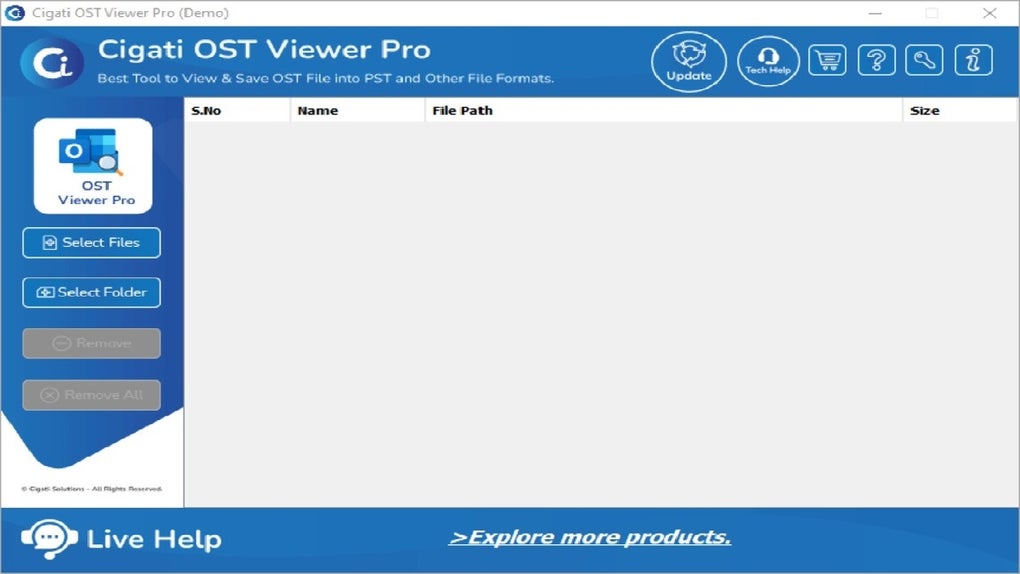
Launch the executable, and you’ll see a clean interface with a “Browse” button. Click it, locate your OST file, and open it. The tool will scan and display the mailbox structure in a tree view.
Expand folders to view individual emails, read their content, and even preview attachments. If you need to recover specific data, you can copy text or save attachments directly to your local drive.
For IT professionals, this tool is a valuable asset during data recovery scenarios or when diagnosing mailbox corruption. It allows you to assess the health of an OST file before attempting repairs or migrations. The lack of installation also makes it ideal for use on temporary or locked-down systems.
Compatibility and System Requirements
The Cigati OST Viewer Tool is specifically designed for Windows operating systems, making it a go-to solution for users on desktops and laptops running Windows 7, Windows 8, Windows 10, and Windows 11. It is not available for Mac, Android, or iOS platforms, so users on non-Windows devices will need alternative tools.
System requirements are minimal, ensuring wide accessibility. You only need a standard Windows PC with at least 1 GB of RAM and 50 MB of free disk space. The tool runs on both 32-bit and 64-bit versions of Windows, and it doesn’t require administrator privileges for basic use. This makes it ideal for use in corporate environments where software installation is restricted.
Because the software is portable (no installation), you can run it from a USB drive, making it a convenient option for on-the-go troubleshooting. This portability also enhances security, as you can use the tool without leaving traces on the host machine.
While it doesn’t support Mac or mobile platforms, its focus on Windows compatibility ensures a stable and optimized experience for the majority of Outlook users. For those needing cross-platform access, consider pairing this tool with cloud-based solutions or using a virtual machine with Windows installed.
Pros and Cons of Cigati OST Viewer Tool
Pros
- Completely free with no hidden fees or trial limitations
- Lightweight and fast, with minimal system resource usage
- Supports all major versions of Outlook OST files
- Secure, local processing with no data uploads
- Portable – no installation required, runs from USB
- Intuitive drag-and-drop interface for easy navigation
- Excellent for data recovery, diagnostics, and previewing archived emails
Cons
- Only available for Windows – no Mac, iOS, or Android support
- No export or conversion feature (you can only view, not save data)
- Limited advanced filtering options compared to paid tools
- No built-in repair function for corrupted OST files
- Basic UI with no customization options
Frequently Asked Questions (FAQ)
Final Verdict: A Must-Have Free Tool for Windows Users
The Cigati OST Viewer Tool stands out as one of the most reliable, free tools for viewing OST files on Windows. Its simplicity, speed, and security make it an excellent choice for both casual users and IT professionals. While it lacks advanced features like data export or repair capabilities, its core function—viewing OST files without Outlook—is executed flawlessly.
If you’re dealing with a corrupted mailbox, need to recover archived emails, or simply want to inspect your OST data without installing Outlook, this tool delivers real value. The fact that it’s portable and secure adds to its appeal, especially in corporate or sensitive environments.
For users seeking a quick, free, and trustworthy solution to access OST files, download Cigati OST Viewer Tool today and experience hassle-free file viewing on your Windows PC.







